High Resolution Identity Swapping in Professional Design Workflows
Synthetic media discussions usually stall at deepfakes and misinformation. That noise obscures the practical utility of generative imagery in legitimate creative workflows. For designers, marketers, and content managers, changing a subject’s identity without a reshoot offers massive efficiency gains.
The real question for professionals isn’t about the technology’s existence, but its usability. How can a tool like Face Swapper fit into a responsible workflow without destroying image quality?
Icons8 positions its Face Swapper as a production utility, not a meme toy. It handles high-resolution outputs up to 1024px. Most mobile apps crush images into muddy thumbnails; this browser-based tool preserves the fidelity needed for web design and digital marketing.
Understanding the Generative Process
Let’s clear up a misconception: this tool doesn’t “copy and paste” a face.
Anyone who has manually composited a face in Photoshop knows the pain. Matching skin tone, lighting direction, and film grain takes hours.
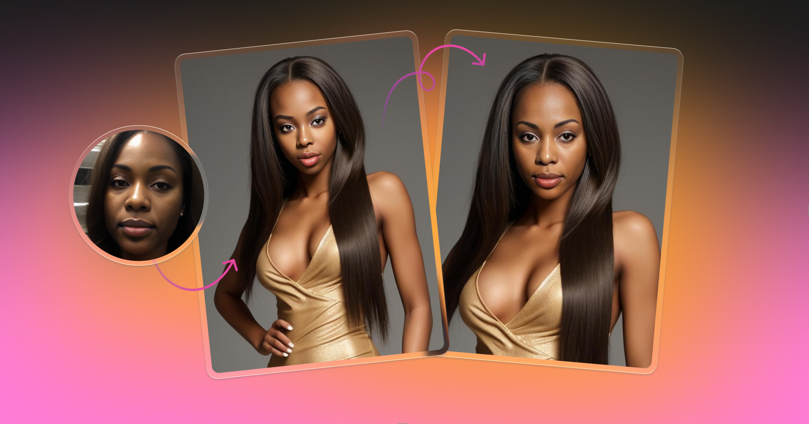
Face Swapper uses AI to generate a new face that exists “in between” the source and the target. It maps the facial landmarks of the target image (the body and scene) and constructs a new identity. This new face resembles the source person but physically adapts to the lighting and angle of the target photo.
The result is a composite that looks like the source person but fits the environment naturally.
Scenario 1: Localizing Marketing Assets
Diversity and representation often create friction in global marketing. A campaign shot in Northern Europe might not land well in Southeast Asia or South America. Yet, organizing separate photoshoots for every demographic burns through budgets fast.
Here is a better workflow.
A marketing manager starts with a high-quality licensed stock photo. It captures the campaign’s mood perfectly. The lighting works. The background fits the brand guidelines. But the model doesn’t reflect the target demographic.
Using Face Swapper, the manager uploads the primary campaign image. They select a source face. This can come from a custom upload of a model with the specific demographic characteristics or from the tool’s built-in library of AI-generated faces.
Since the tool supports files up to 5 MB and outputs at 1024x1024px, the result stays crisp enough for newsletters, social ads, and blog headers.
The AI handles the heavy lifting. It aligns the new face with the original model’s pose, whether it’s a front-facing portrait or a side profile. Brands maintain visual consistency across regions without funding international casting calls.
Scenario 2: Protecting Privacy in UX Portfolios
User Experience (UX) researchers face a paradox when building portfolios.
They possess rich documentation of user testing sessions. Photos of participants interacting with prototypes add crucial context and humanity to case studies. But strict privacy agreements and GDPR regulations usually forbid showing real faces publicly.
Blurring faces is the traditional fix. It also ruins the aesthetic. A blurred face dehumanizes the subject and distracts the viewer.
Identity obfuscation offers a cleaner solution.
A designer takes original photos from the testing session and runs them through Face Swapper. By swapping the participant’s face with a generated “non-existent” person or a stock model, the designer preserves the human element. The expression, gaze, and reaction remain visible. The actual individual stays anonymous.
The tool’s multiswap feature shines here. If a photo contains a moderator and a participant, the AI detects both. The designer swaps only the participant’s face, leaving the moderator untouched. The final asset is legally safe for public portfolios.
A Day in the Life: The Social Media Sprint
Meet Ren, a social media manager for a beverage brand. It’s 2:00 PM. A specific meme format is trending. To capitalize on the moment, Ren needs to insert the company’s CEO into the meme template.
- Selection: Ren grabs the high-res meme template.
- Upload: He drags the file directly into the browser. No complex layers or timelines here.
- Source: He uploads the CEO’s professional headshot. He skips cutting out the background or feathering edges; the tool accepts the raw JPG.
- Processing: He hits the swap button. The AI analyzes the meme figure’s geometry and maps the CEO’s features onto it.
- Review: The result looks good, but the skin texture clashes with the low-quality meme template. Ren uploads the result back into the tool and swaps it with itself. This “skin beautifier” hack smooths out artifacts.
- Delivery: He downloads the final PNG and schedules the post.
The whole process took five minutes. Manual masking and color correction would have taken thirty.
See also: Recruitment Tech: How ATS Changes Hiring Forever
Comparing the Landscape
The face manipulation market is crowded. Options range from mobile entertainment apps to professional compositing software.
Versus Manual Compositing (Photoshop):
Photoshop remains the king of control. For a 4K billboard print, you need manual tools. You must dodge, burn, and match noise patterns by hand. But for digital-first assets, manual compositing is overkill. Face Swapper achieves 90% of the result in 1% of the time.
Versus Mobile Apps (Reface/FaceApp):
Mobile apps prioritize virality over utility. They aggressively compress images, watermark the output, or fail when multiple faces appear in a frame. faceswapper ai differentiates itself by focusing on desktop-class resolution and batch processing. It serves workflows, not group chats.
Limitations and When to Look Elsewhere
AI isn’t magic. The technology has boundaries.
Obstructions are the Enemy:
The documentation notes struggles with obstructed faces. If a hand, microphone, or thick glasses frame covers part of the target face, the AI often produces “smudging” artifacts. Manual editing becomes unavoidable in these cases.
Extreme Angles:
The AI generates a face “in between” source and target. If angles differ too much, geometry breaks. Swapping a front-facing driver’s license photo onto a profile shot looking 90 degrees left rarely works. The result looks like a mask sliding off.
Batch Processing Speed:
The browser interface handles batches, but performance degrades with volume. For processing thousands of images for a dataset, skip the browser and use the API to avoid bottlenecks.
Practical Tips for Best Results
Match the Lighting:
The AI adapts lighting, but physics still apply. You get better results if source and target photos share a lighting direction. Don’t force a left-lit source onto a right-lit target.
Resolution Matters:
Output quality depends on input quality. The maximum face size is 1024×1024 px. Ensure your source face is sharp. If you feed the tool a blurry, pixelated face, the AI cannot invent missing details.
The “Beautifier” Trick:
As mentioned in Ren’s workflow, uploading the same photo as both source and target acts as an automated retouching pass. The generative process naturally smooths skin imperfections and reduces noise.
Leverage the Ecosystem:
Since this tool belongs to the Icons8 suite, it pairs with their Smart Upscaler. If 1024px isn’t enough, run the result through the Upscaler to push resolution higher for print.
Treat this as a generative assistant rather than a simple cut-and-paste utility. Do that, and you save hours of manual retouching time.